
In this post, I’ll walk through why your LinkedIn profile already works like a landing page, what worked when I used this approach myself, and the exact steps you can take to get your first coaching or consulting client- even if you’re a full-time 9-to-5 professional with almost no visibility right now.
The Real Problem Isn’t Your Following
The biggest problem when you’re starting out is that, in most cases, you’re a 9-to-5 professional. You’re totally engulfed in your job: go to office, come home, go to office, come home. That’s been the routine and the strategy.
You know HR, marketing, finance, operations, or your core IT stuff; you know your job inside out. But when it comes to starting a coaching or consulting practice, the question in your head is: how do I get clients?
So you look at social media. You see people posting on Instagram, YouTube, Facebook, and everywhere else. But your visibility is low, or constrained by your job, or sometimes it’s just procrastination or laziness.
Why LinkedIn Works Differently
LinkedIn is a different kind of platform. Your profile works as a landing page.
Why LinkedIn? Because your headline already tells people who you are and what you do. Your education, your experience, your posts, and the people you’re connected with are all there too.
That creates a professional network, unlike Facebook, where your connections are mostly friends and family who won’t pay you. The paying people come from your professional network.
On LinkedIn, you also have your banner, profile picture, experience, recommendations, About section, and a place to list your services. Together, that’s your personal brochure. It shows who you are, your expertise, and your capabilities based on the organizations you’ve worked with even without you spelling it out.
Your Profile Is Already a Landing Page
So what exactly is a landing page? It’s a micro version of a website, a single page where a person lands.
People used to prefer full websites, but a website might have 20 or 30 links: About, Work With Us, Careers, and so on. With that many options, a prospect could leave or get lost somewhere in the maze.
A landing page has a clear structure instead: a hook, the basics, information about your subject, testimonials, and what you’re offering. It has only two possible outcomes: the visitor takes action, or they leave.
When someone takes action, they’re usually leaving their email, their phone number, or both. In most landing pages, the primary call to action is email; the secondary is a phone number or something else.
Mapping Your Profile to a Landing Page
Here’s how this maps onto your LinkedIn profile:
- Headline — says who you are, who you help, and what you deliver. You can also mention if you’re associated with the best in your industry (for example, working with a Big Four firm).
- Experience — works like a testimonial. It shows the organizations you’ve worked with and what you can do.
- About section — tells people who you are, who you help, what you can do, what you’ve done in the past, and how to reach you.
- Education — shows your qualifications and helps you stand out.
Put together, that’s your landing page — already built.
What I Did: My LinkedIn Client Story
Here’s what I actually did. I started posting on LinkedIn regularly in October 2025. At first, I wasn’t getting much traction.
Then I started engaging with other people’s posts, including influencer posts, and I kept writing my own content. People started commenting on my posts, and that became a flywheel.
Because of that flywheel, I started getting leads. People messaged me directly, and those conversations turned into one-on-one coaching calls for my SIP Founders and SIP Accelerator programs.
The Strategy, Step by Step
Because this worked for me, here’s exactly what I did, starting in October:
- Posted regularly, three to five times a week.
- Commented on other people’s posts, which activated my extended network.
- Engaged before and after every post I published, to keep my profile active.
- Sent connection requests to my desired audience, my ICP, which is mid-career IT professionals.
Some people I connected with noticed what I was doing and reached out on their own.
Others I reached out to directly. Through that process, I got an Accelerator client (my 90-day, one-on-one focus program) and a Founder client (my one-month, one-on-one dedicated program).
What This Looked Like in the Numbers
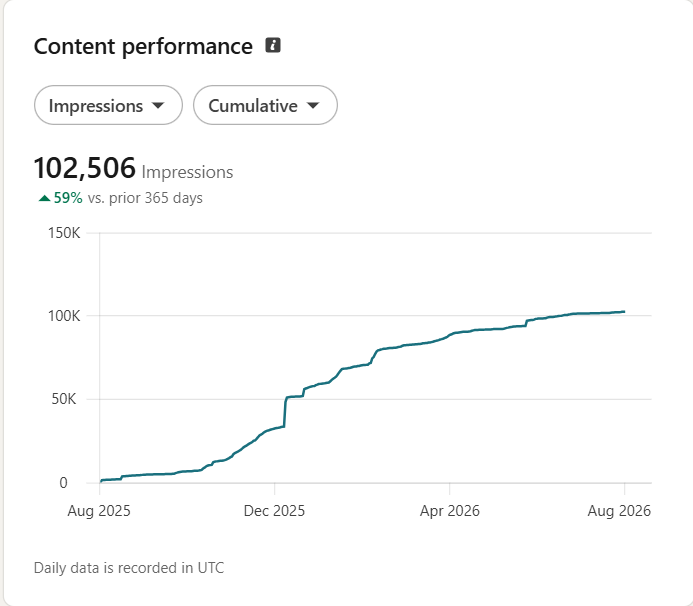
Over the past year (August 2025 to August 2026), my LinkedIn content generated 102,506 impressions — up 59% over the prior 365 days and reached 42,580 members.
61% of that reach came from outside my own network, which is exactly what the comment-and-engage flywheel is supposed to do: put you in front of people you’re not already connected to.
On engagement, the year added up to 2,532 social engagements, 1,483 reactions, 957 comments, 22 saves, 62 sends, and 8 reposts — plus 57 link engagements. My follower count now stands at 7,390.
Four Things to Fix on Your Profile First
If you want your first client from LinkedIn, you don’t need to be highly visible — no matter how senior you are. The first thing to do is start.
Work on these four things, in order:
- Headline: make it strong. You can use AI to help you figure out how to describe what you talk about and who you help.
- About section: make it better.
- Experience section: make it better.
- Education section: make it better.
There’s not much more you can do beyond this, but you can absolutely do this much. These four things are what serve as your landing page.
Two Ways to Find Your First Clients
Once your profile is ready, start sending connection requests to your targeted audience.
Way one: look for signals. Say you’re in HR and you want clients for career coaching or resume work. Search LinkedIn for phrases like “looking for a job,” “interview preparation,” or “how to prepare for an interview.” You’ll find people posting exactly that. Comment on their posts, or reach out to them directly.
Way two: connect with people junior to you. Keep sending connection requests to people who are a step behind you in their career.
And the most important thing: start writing content in your domain.
Niche Down for Authority
If you’re an HR professional and want to offer consulting, write about what’s happening in HR recruitment, training and development, performance appraisal, exit interviews, and share your views regularly.
Once you keep writing and commenting, the people following the people you engage with will start to notice you as valuable in that space.
It helps to focus on one area rather than all of HR. For example, if you know labor law or industrial safety requirements well, you can consult for SMEs on exactly that rather than general HR.
Coaching vs. Consulting: Who’s Your Client?
For coaching, look at people who are job hunting. You can coach them on how to get a job, or how to write an ATS-friendly resume.
If you’re a mid-career IT professional in a specific technology, there are two offerings for you:
- Coaching people junior to you — on the same technology, on career growth, or on getting a job in your domain. Share the process you followed to get where you are; someone else can follow it too.
- Consulting for organizations. Start by looking at what kind of projects are in demand on Upwork. Identify organizations you could consult for, and reach out directly through LinkedIn Messenger — even to a decision maker you don’t know yet, through a blank connection request. Once they accept, build the relationship before you bring up consulting or coaching.
The general rule: if you’re at level 10 and someone is at level 9, you can coach them. If someone is at your level but struggling with something you’ve already solved, they’re a consulting client.
Write About Your Work Without Naming Your Employer
There’s a second way to attract both coaching and consulting clients: write about the domain or topic you work in, without naming your organization.
For example, if you’re a data architect or an AI leader, write about AI leadership, what’s happening in AI, what’s happened in the past, and how it’s impacting organizations.
This does two things. People junior to you notice you know the space and may reach out about moving into leadership in that domain. And people who comment on your posts SME owners, people at other companies become part of your potential network, either as clients or as people you could mentor.
Your Next Steps
Here’s what I’d suggest you do next:
- Fix your headline. The formula is “I help [X] achieve [Y].” Follow it with your credentials — why you’re the right person to help someone achieve this.
- Work on your About section.
- Get testimonials. Reach out personally — call the person, don’t just send a request — and ask specifically for a testimonial in your domain. Ex-colleagues and ex-bosses are a good place to start.
- Check your keywords. Make sure your headline and About section carry the right keywords for your domain. You can ask Claude, ChatGPT, or any AI: describe who you are, who you work with, and who you want to help — then ask what to write in your headline, About section, and Experience section.
Here’s a prompt you can copy, paste, and fill in to do exactly that:
I am [your name], and I currently work as [your job title] at [your organization or industry]. I want to start offering [coaching/consulting / both] to [describe who you want to help — for example, mid-career IT professionals, HR professionals, or job seekers]. My key skills and experience are: [list 3–5 things you’re genuinely good at or have delivered results in]. I’ve worked with, or trained at: [companies, clients, or certifications, if relevant].
Based on this, write me:
- Three LinkedIn headline options using the formula “I help [X] achieve [Y],” followed by one line of credentials.
- A LinkedIn About section (under 2,000 characters) that states who I help, what I’ve done, and how to reach me.
- Three bullet points I can add to my current Experience section to make my results and expertise clearer to someone scanning my profile.
- A list of 8–10 keywords relevant to my niche that I should naturally work into my headline and About section so I show up in the right searches.
This has worked for me, and it’s worked for others who’ve been on LinkedIn a while too.
If you’re a mid-career IT professional looking to monetize your expertise outside your employment, I’ve built a free community for exactly this: Second Income Professional (SIP).
Join the weekly SIP challenges for free, take action, and if you want personal guidance, the community is where you can connect with me directly.